Passport Renewal Canada Photo Requirements: The Complete Guide (2026)
Wrong photo = rejected application. Learn every official rule — size, background, expression, glasses, baby photos, and digital specs — so you get it right the very first time.
⚡ Passport Renewal Canada Photo Requirements — At a Glance
Picture this: you spent time filling out your renewal form perfectly, gathered every document, booked your appointment, and waited in line — only to be told at the counter that your photo doesn’t meet the requirements. Application rejected. Start over.
This is not rare. Passport photos are the single most common reason Canadian passport applications get delayed or rejected — and the frustrating part is that most of these rejections are completely avoidable.
This guide covers every single rule you need to know about Passport Renewal Canada Photo Requirements in 2026 — from the exact measurements to the hidden rules most people miss. Read it once, get your photo right, and never worry about rejection.
Canada uses a rectangular photo format — and this is where a lot of people make their first mistake. Many people confuse the Canadian format with the American square format. They are not the same.
Passport Renewal Canada Photo Requirements specify the following exact dimensions:
- 📏Photo width: 50mm (2 inches)
- 📏Photo height: 70mm (2¾ inches) — rectangular, NOT square
- 👤Face height (chin to crown of hair): Must be between 31mm and 36mm
- 👁️Eye level from bottom of photo: Approximately 39mm
- 👔What’s visible: Full face, neck, and top of shoulders — nothing else
Here’s how Canada compares to other countries so you understand exactly why being specific matters:
The background rule sounds simple — plain white. But there are several ways it can go wrong, and any one of them means your photo is rejected.
- ✅Plain white or very light-coloured background — no exceptions
- ✅Clear contrast between your face and the background
- ✅Even, shadowless lighting behind you
- ❌No patterns, textures, wallpaper, or curtains visible
- ❌No shadows on the wall behind you — even slight ones cause rejection
- ❌No other people or objects visible in the frame
- ❌No AI-generated or digitally added white backgrounds
✅ Good Background
- ✔Plain white painted wall
- ✔Even lighting, no shadows
- ✔Clear face-to-background contrast
- ✔Stand 60–90cm away from wall
- ✔Natural or soft studio lighting
❌ Rejected Background
- ✖Patterned wallpaper or curtain
- ✖Shadow cast on back wall
- ✖Gradient or coloured background
- ✖AI background removal app
- ✖Any object or furniture visible
Special case — Wheelchair users: If your wheelchair has a headrest, place a plain white covering over it. This ensures the background remains consistent behind your head and shoulders.
Many people think a friendly smile makes for a better photo. For a Canadian passport, the opposite is true — and there’s a technical reason for it.
Canada’s passport verification system uses biometric facial recognition technology. This system matches the unique shape and geometry of your face. When you smile, the shape of your face changes — your cheeks rise, your eyes narrow, your jaw shifts. This can cause verification failures at border crossings years down the line.
- 😐Neutral expression — completely relaxed face
- 👄Mouth fully closed — no teeth visible, no lip tension
- 👀Both eyes open, looking directly into the lens
- ⬛Face squared to the camera — head NOT tilted left, right, up, or down
- 🧑Face and shoulders centred in the frame
- ❌No squinting, no raised eyebrows, no frowning
Glasses rules are one of the most frequently misunderstood parts of Passport Renewal Canada Photo Requirements. The rules changed in recent years, and many people still follow outdated information.
| Glasses Type | Allowed? | Condition |
|---|---|---|
| Clear prescription glasses — no glare | ✅ Allowed | Eyes must be fully visible |
| Clear prescription glasses — with glare | ❌ Rejected | Retake photo required |
| Tinted or lightly coloured glasses | ❌ Never | Even lightly tinted prescription lenses are banned |
| Sunglasses | ❌ Never | Not permitted under any circumstance |
| Frames covering part of eye | ❌ Rejected | Both eyes must be fully visible |
| No glasses at all | ✅ Safest | Removes all risk of rejection |
Canada respects religious and cultural practices. Head coverings worn as part of daily religious observance or for medical reasons are permitted — but with strict conditions.
- ✅Religious head coverings (hijab, turban, kippah, etc.) — permitted if worn daily
- ✅Medical headwear (post-surgery covers, cancer-related head coverings) — permitted with doctor’s note
- ✅Nasal cannulas for medical oxygen use — permitted
- ❌Fashion hats, caps, bandanas, or decorative scarves — not permitted
- ❌Any covering that casts a shadow on your face — not permitted
- ❌Anything that obscures any part of your face, hairline, or jaw
The government requires photos that are unaltered — and in 2026, this rule is enforced more strictly than ever due to the rise of AI photo editing tools.
Many people think “unaltered” just means no heavy filters. The reality is much stricter. Even small adjustments count as alterations and will get your photo rejected.
Additional quality requirements:
- 🖨️Printed on high-quality photographic paper — glossy or matte is fine, but no regular printer paper
- 🔍Clear, sharp, and in focus — no blurry or pixelated photos
- 🌈Colour photo required (though black and white is technically acceptable, colour is strongly preferred)
- 💡Evenly lit — no harsh shadows on face, no hot spots or overexposure
- 🙅No crease, fold, hole punch, or ink mark on the photo
This is the single most overlooked requirement in all of Passport Renewal Canada Photo Requirements. Most people don’t even know it exists — until their application is rejected because of it.
One of your two submitted photos must have specific information written or stamped on the back by the photographer. This is why home-printed photos, even if they look technically perfect, are almost always a problem.
🔏 What Must Be on the Back of One Photo:
Before you leave the photo studio, flip one photo over and check that all this information is there. If the photographer forgot, ask them to stamp it before you walk out. It takes 30 seconds and saves a massive headache.
Whether you need a digital or printed photo depends on how you’re renewing. Here’s the clear breakdown:
🖨️ Printed Photos
In-Person or Mail Renewal
- 📸 2 identical photos required
- 📏 50mm × 70mm physical size
- 🔏 Photographer stamp on back (required)
- 🖨️ High-quality photographic paper only
- 🚫 No home printing
- 🚫 No AI-altered photos
📱 Digital Photo
Online Renewal Only
- 🖼️ 1 digital file required
- 📐 Minimum 420×540 pixels (JPEG)
- 💾 File size: under 5MB
- 🔏 No stamp required
- 🚫 No AI backgrounds or edits
- 🤳 Same face/expression rules apply
Getting a passport photo for a baby or young child is one of the most challenging parts of the process. The good news: the government allows some flexibility for very young infants. The bad news: the same basic rules still apply.
- 📏Same size as adults: 50mm × 70mm, face 31–36mm chin to crown
- 👶Neutral expression required — but infants have some flexibility allowed
- 🤲No hands visible in the photo — not yours, not the child’s
- 🪑Newborns may be placed in a car seat with a plain white cloth behind the head
- 👀Eyes should be open if possible (flexibility given for very young infants)
- 📸Must be taken by a commercial photographer — home photos are not accepted
- 🎽Dress child in darker colours — not white
Feed Before the Session
A fed, comfortable baby is a calmer baby. Schedule the photo after a feeding for the best chance of a neutral, relaxed expression.
Dress in Dark Colours
Avoid white clothing for the same reason as adults — it blends into the white background. Navy, grey, or any dark solid colour works perfectly.
Use an Experienced Photographer
A photographer experienced with baby passport photos knows all the specific Canadian requirements and how to position an infant correctly.
Book Early, Allow Time
Baby sessions take longer. Book in the morning when babies are usually most alert and cooperative. Give yourself extra time.
Choosing the right place to get your photo taken is just as important as knowing the rules. Not all photo studios are equally familiar with Canadian passport specifications.
Good options for getting your photo taken:
- ✅Professional photography studios — best quality, most familiar with requirements
- ✅Shoppers Drug Mart — photo service at most locations, staff trained in Canadian specs
- ✅London Drugs — photo department at most stores, same-day service
- ✅Canada Post outlets — many locations offer passport photo service
- ✅Dedicated passport photo studios — specialized, usually cheapest and fastest
- ✅Some Walmart and Costco photo centres — check if passport photos are offered at your location
Avoid these options:
- ❌Home printer — paper and quality will not meet requirements
- ❌Most photo booth machines — typically US size (square), not Canadian spec
- ❌AI passport photo apps — background removal counts as alteration
- ❌Generic online photo services not specifically for Canada
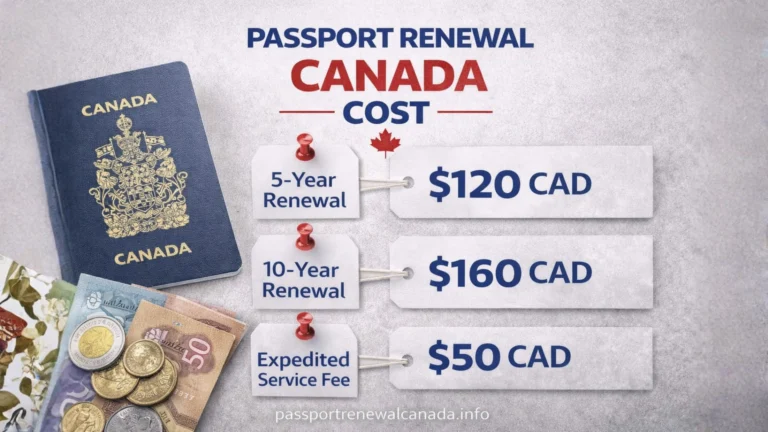
Cost typically ranges from $15 to $30 CAD for a professional set. When you consider the cost of a delayed application or a rejected appointment, this is one of the best small investments you can make.
These are the exact reasons the government rejects passport photos. Avoid all eight and your application will sail through without issues.
❌ Wrong Photo Size
Using US 2×2 square photos or another country’s format. Always say “Canadian passport” and confirm 50mm × 70mm before you pay.
❌ Face Too Small or Too Large
Face height must be 31–36mm. Ask the photographer to measure before printing. This is a very common DIY mistake.
❌ Shadows on Face or Background
Stand away from the wall (60–90cm) and use even lighting. Any shadow — even subtle — triggers rejection.
❌ Smiling or Open Mouth
No smiling. Ever. Not even a small one. Mouth completely closed, face completely relaxed. Practice in the mirror beforehand.
❌ White Clothes on White Background
Your shoulders blend into the background. Wear darker, solid-coloured clothing for every passport photo session.
❌ Glare on Glasses
The safest move is removing your glasses entirely. If you must wear them, adjust your head angle until all glare disappears.
❌ Edited or AI-Enhanced Photo
Any adjustment — brightness, red-eye, AI background — counts as alteration. Always ask the photographer: “zero editing, exactly as taken.”
❌ Missing Photographer Stamp
Check the back of the photo before leaving the studio. Studio name, address, and date taken must be there. This small detail trips up many applicants.
The government doesn’t specify a dress code — but smart clothing choices help you avoid the most common background contrast rejection.
- ✅Dark, solid-coloured tops — navy, dark grey, forest green, burgundy, black
- ✅Everyday regular clothing — what you normally wear is perfectly fine
- ✅Natural-looking makeup — everyday makeup is allowed and normal
- ❌White or very light-coloured tops — blend into background
- ❌Busy patterns, stripes, or graphic prints — can distract from facial features
- ❌Heavy theatrical makeup that dramatically changes your appearance
- ❌Face paint, novelty contacts, or costume elements of any kind
Getting your Passport Renewal Canada Photo Requirements right comes down to five things you must never forget:
- 1️⃣Size is non-negotiable: 50mm × 70mm, face 31–36mm — confirm this with your photographer every time
- 2️⃣White background, dark clothes: Never wear white or light colours to a passport photo session
- 3️⃣Neutral face, mouth closed: No smiling — not even a hint of one
- 4️⃣Zero editing: Tell your photographer explicitly — no corrections, no enhancements, no AI tools
- 5️⃣Check the stamp: Before leaving the studio, flip the photo and confirm the studio name, address, and date are stamped on the back
One right photo means one smooth passport renewal. If you also want a complete step-by-step guide for the in-person renewal process — including documents, fees, and appointment booking — visit passportrenewalcanada.info for the full guide.
And remember: the best time to get your passport photo taken is before the deadline pressure hits. Give yourself plenty of time, use a professional, and follow these rules exactly.
🍁 Ready for Your Full Passport Renewal?
Now that you know the photo requirements, get the complete step-by-step guide for your full renewal — documents, fees, appointments, and processing times — all in one place.
Visit PassportRenewalCanada.info →